 Risk Management
Risk Management Software
Know what could go wrong and who is handling it
Log risks, assign someone to watch each one, write down the plan for dealing with it, and link it to the milestone it could derail. Review them in a board view or a list.
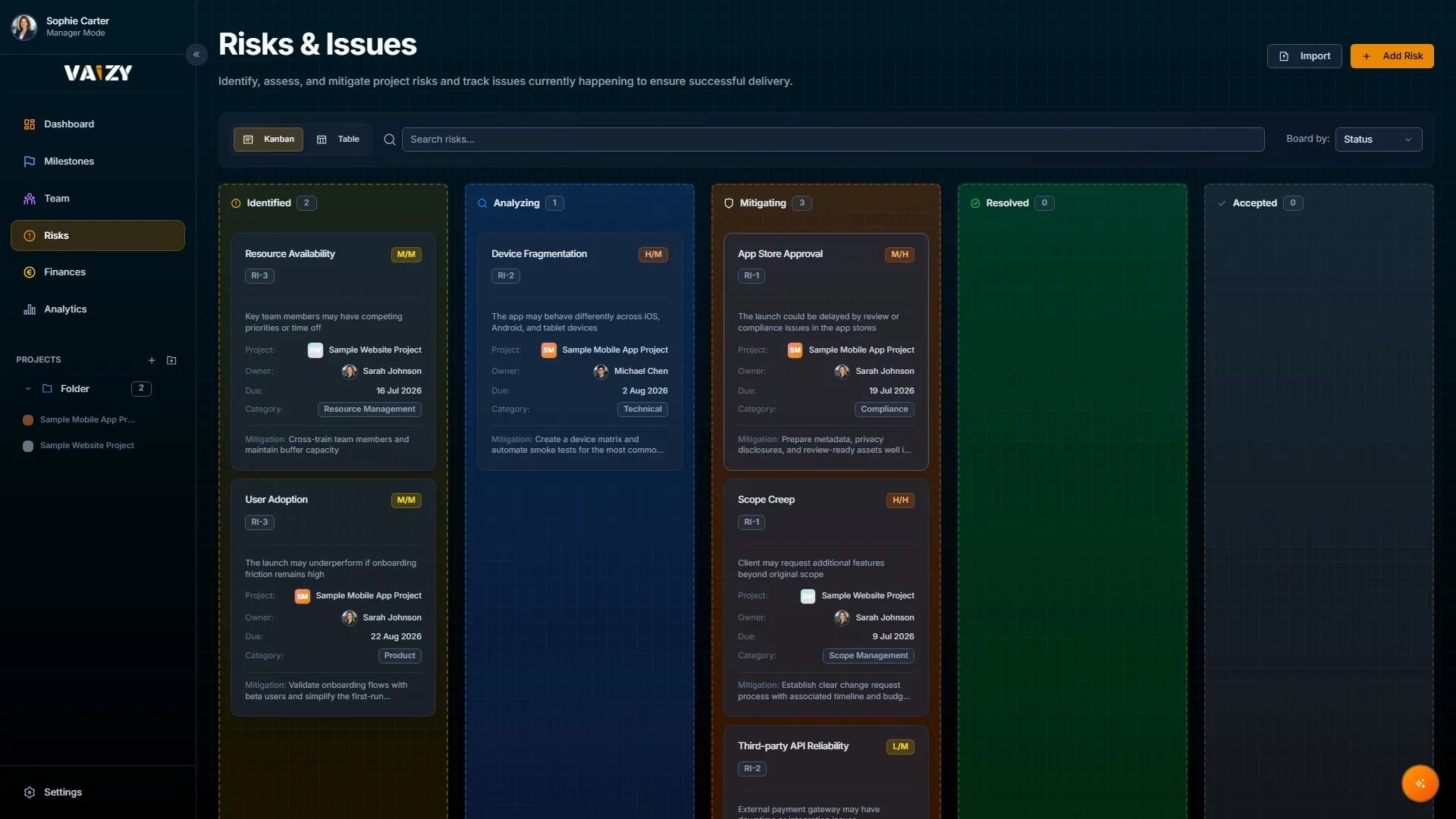
Most risk logs sit in a spreadsheet nobody looks at. Vaizy connects each risk to the work it affects so the list stays relevant.
Risk board
See all risks on a board grouped by status: Open, Mitigated, Accepted, or Closed. Drag a card to update it.
A live list of all open risks across your projects.
Mitigation plans
Write down what you are doing about each risk. Update it as things change. Keep a record of decisions.
Each risk linked to the milestone or project it affects.
Linked to milestones
Connect each risk to the milestone it threatens. When you review a milestone, the risks around it are already visible.
Clear ownership so everyone knows who is watching what.
Log a risk with an owner, a severity level, and a link to the milestone or project it affects.
Write down what is being done about it and update the status as the situation changes.
Review open risks in your next project meeting with the linked milestone and budget context already in front of you.
Turn your risk list into something people actually use
Risks only get managed when someone owns them and the context is visible. Vaizy makes that the default.